Cybersecurity Solutions for Small Business Owners Who Think They’re Too Small to Be Hacked
Have you ever thought to yourself, “We’re too small for anyone to care about us”? Seems logical, right? Why would an IT professional hack a 12-man accounting firm in Ohio when they could be hacking a Fortune 500 Company? They would think the same way you are, which means you are already behind the curve and in dire need of a cybersecurity solution for small business.
The reality is that hackers do not care how big or small you are – they only care about one thing: an easy target. Cybercriminals attack small businesses all the time because they know that bigger companies have budgets for cybersecurity solutions. In this article, I’m going to discuss why this line of thinking can cost you, the tools necessary to protect your business, and how compliance software plays a role in the cybersecurity puzzle that most people don’t teach you.
Table of Contents
Why “Too Small to Be Hacked” Is the Most Dangerous Sentence in Business
The Real Numbers Behind SMB Cyberattacks
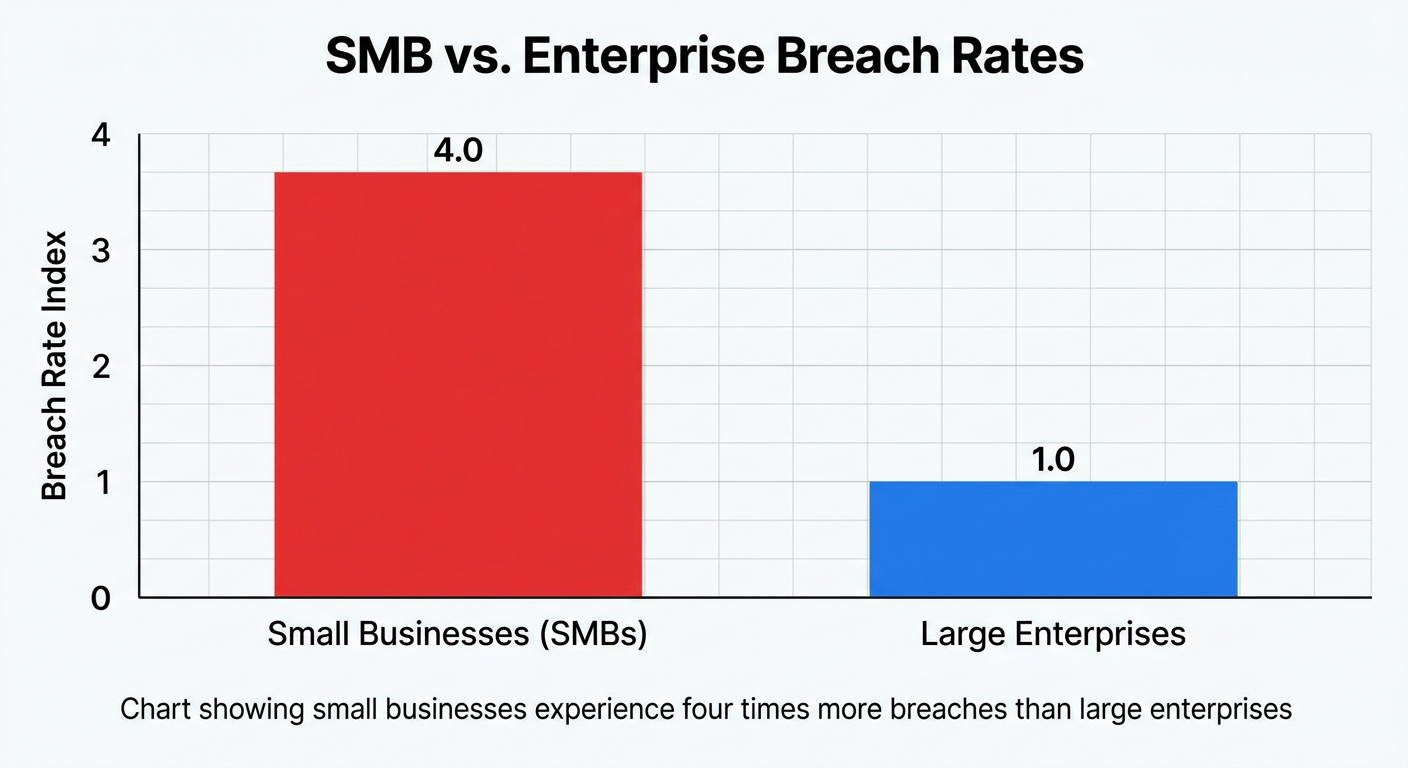
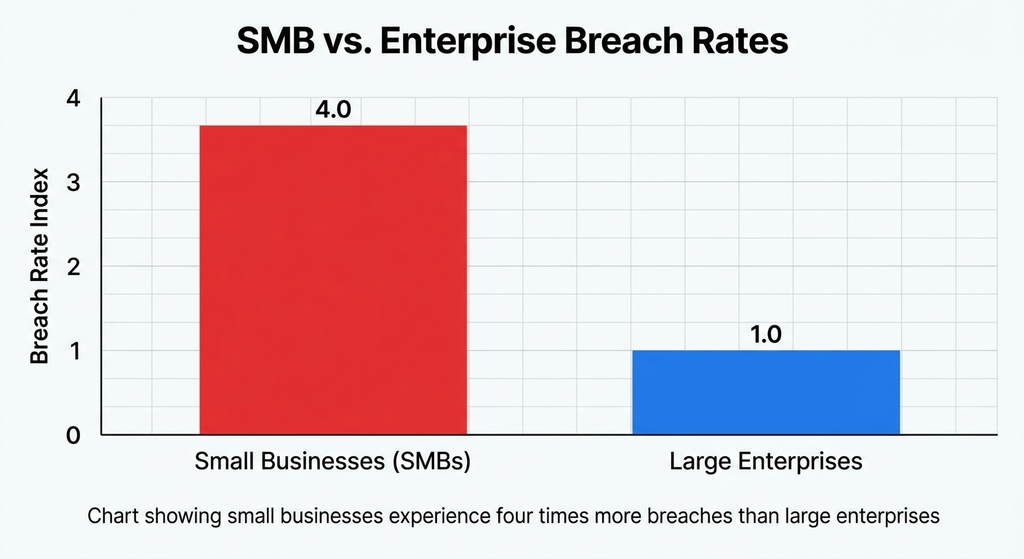
Let’s look at the statistics instead of using our imaginations to conjure up frightening scenarios, shall we? According to the Verizon Business 2025 Data Breach Investigations Report, small and mid-sized enterprises now face 4x more breaches than big corporations. PreVeil’s 2025 research shows that 61% of small businesses suffered an attack in the last year, and 88% of those were ransomware, compared to 39% among large companies.
It is only a matter of time before a small business will have to face a cyber criminal. And the reason why cybercriminals choose small business is because they believe they have a higher chance to avoid detection than with larger organizations.
Why Hackers Actually Prefer Small Targets
The main factors contributing to the high percentage of ransomware attacks in small businesses are
- Absence of updated software due to not having an IT department
- Passwords being shared between personal and work-related software
- Complete lack of security training for employees
- Storing customer data in accessible locations
There is no need for complex infiltration techniques because most of the first four points basically have a “Help” sign blinking above them for hackers to see. Modern attackers use various methods penetrating air-gapped networks – 79%, according to CrowdStrike’s 2025 Global Threat Report, have absolutely nothing to do with malware.
The Cybersecurity Solutions for Small Business That Actually Matter
There is a lot of noise in the industry with vendors hawking “AI-powered” solutions, scare tactics, and buzzwords that mean nothing to the landscaping business owner or the family-run dental practice. Let’s separate the wheat from the chaff.
The Non-Negotiables
No matter what other measures you take, these are the absolute items that should always be included in your cybersecurity plan:
Multi-factor authentication for all administrative software including but not limited to your email, financial accounts, and cloud storage. MFA will stop the vast majority of would-be hackers.
Backups, ideally automated and kept in a separate location from your primary network. Ransomware-proof your data with regular backups.
Anti-malware software for all endpoints, including your mobile devices.
Security awareness training for your staff, including contractors and part- time employees. Cybercriminals are social engineers, and often one member of your staff may fall for a well-crafted phishing email that gives attackers access to your network.
Incident response plan, or a detailed checklist of steps you have to take immediately after a cyberattack, physical theft, or other security-related incident. Ideally, this plan should be no more than a page long.
The best part is that every one of these items is generally quite affordable, with the combined cost often being lower than the damage budget analysts at IBM calculate as the average cost of a data breach to a small business. A data breach in 2021 costs over 3 million dollars on average, with the additional indirect costs pushing the number higher.
The Overlapping of Compliance and Cybersecurity
The other thing that many small and medium- sized enterprises discover to their detriment is that cybersecurity and regulatory compliance are not entirely separate subjects. Depending on the industry you’re in, you may have to keep client and employee data secure in accordance with regulations that have nothing to do with cybersecurity at first glance. But the moment you fail at protecting that data, you’ll see investigators from both fields knocking on your door.
How Compliance Management Software Fits Into Your Cybersecurity Stack
Automated Compliance Management vs. Manual Checklists
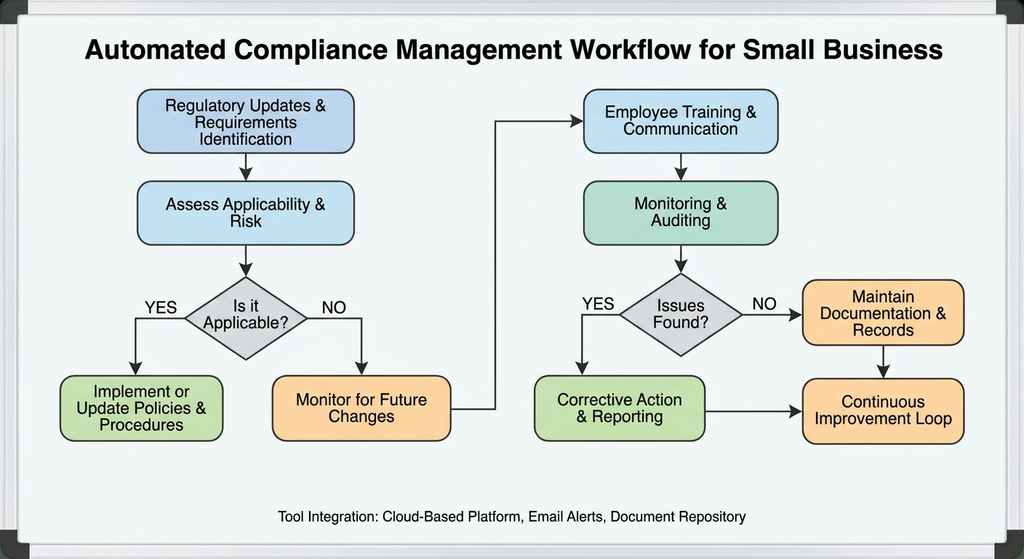
I’ve spoken with small business owners that track their compliance requirements in a Word document that hasn’t been updated since 2022. The issue is that regulations change, and often do so incrementally and without much publicity.
Automated compliance management tools:
Alert you when a policy needs to be updated based on regulatory changes
Keep audit trails of your compliance activities (in the event of a breach, you’ll need to show your regulators)
Notify you of upcoming deadlines for security assessments
Document your security controls against the applicable compliance frameworks
Checklists are great up to the point when they aren’t. This happens most when a regulator or insurance auditor asks to see something that isn’t documented.
When You Actually Need GRC Software
GRC software (Governance, Risk, and Compliance) is a term that, until recently, has been associated only with enterprises of the Fortune 500 variety. That is no longer the case. If your organization is:
- Processing large amounts of sensitive customer data
- Operating in multiple states with varying privacy laws
- Dealing with enterprise customers who require vendor security assessments (and this is becoming more and more common)
- Experiencing more than 50 employees
Then GRC software is no longer a strategic nicety, but an operational necessity, centralizing all of your risk assessments, compliance-related documents, and security policies in one auditable location (as opposed to a disorganized Excel file on your shared drive).
Building a Realistic Cybersecurity Budget as a Small Business
Free and Low-Cost Protections You Should Start With Today
You don’t necessarily need a six-figure security budget to make meaningful improvements. Here are some good places to start:
- Enable MFA (free, built into most platforms like Google Workspace and Microsoft 365)
- Password manager (many offer good business tiers for less than $5/user/month)
- Enable automatic OS/software updates (free, but frequently ignored)
- Phishing simulation software (some have free tiers that can be used to train employees)
When It’s Time to Invest in Managed Security
Once you’re dealing with sensitive data, working remotely from many locations, or just don’t have the capacity to dedicate someone to monitoring threats full-time, consider budgeting for:
- A managed detection and response (MDR) service
- Cyber liability insurance (more vendors and clients are requiring this)
- A compliance management software-as-a-service to keep documentation audit-ready
For help figuring out which security tools fit your specific needs at your specific stage of growth, our team has created a practical guide to choosing business software by company size . It goes more in-depth about budget ranges and considerations.
A Simple 5-Step Action Plan You Can Start This Week
- Audit your existing accounts — identify all the tools that have access to customer and financial data
- Enable multifactor authentication for any software that can support it
- Backup your most crucial data in another location outside your network
- Create a 30-minute security training video for your employees (or hold a training session if you prefer)
- Conduct one compliance check on one regulation that applies to your industry and ensure that you are in compliance
None of these actions should break the bank. They may take some time (probably around a day in total), but the investment is worth it.
Conclusion on Cybersecurity Solutions for Small Business
The idea that your business is “too small to be hacked” is not only incorrect but statistically improbable. In fact, small businesses are hacked more often, in greater numbers, and with more damaging effects than most big corporations due to them being unable to invest heavily into cybersecurity measures.
However, that does not mean that there are not free cybersecurity solutions for small business that do not require breaking the bank. All it requires is for you to begin right away, follow a few simple best practices, invest money into compliant and small business-friendly software for cybersecurity small business solutions, and become committed to the process. After all, when it comes to cybersecurity solutions for small business, learning how to breathe is a skill that you should have spent decades cultivating since day one.
Frequently Asked Questions
1. How much should I expect to spend on cybersecurity as a small organization
Most small companies (with heads of organization under 20) can expect to spend between $100 and $500 per month on tools that offer multi-factor authentication, end-point protection, and a password manager. The costs tend to escalate ($1000-$3000+ per month) if one chooses to invest in extra layers such as managed detection and response or compliance software.
2. What is the most cost-effective cybersecurity measure for small organizations?
The absolute most cost-effective cybersecurity measure is multifactor authentication. It is often available for free or at an extremely reasonable price and will safeguard one’s business against the most pervasive threats. According to CrowdStrike’s 2025 threat landscape report, cybercriminals will continue to target weaknesses in authentication procedures.
3. Is compliance software something that a small business will benefit from?
It depends on what sphere of business one operates in. With that said, most states require organizations to have a protocol in case of a data breach, and it is often enough to invest in cybersecurity measures that will help one stay compliant with relevant regulations.
4. What is the difference between compliance software and GRC software?
Compliance software is designed to help organizations remain compliant with regulations, standards, and internal policies. GRC software, on the other hand, is designed to help organizations manage governance, risk, and compliance. Essentially, GRC software is more comprehensive and unifying, and it usually comes into play when an organization has already passed the small business stage (50+ employees) and has more substantial clients that require specialized compliance measures.
5. What is the outlook for small businesses that have suffered a ransomware attack?
Depending on whether one has invested in offline data backups and emergency response services, it can take anywhere from a few days to several months to restore essential operations. As the days go by, a ransomware attacker will continue to demand payments, and, in many cases, businesses are unable to resume operations after they have suffered an attack. According to experts in the cybersecurity industry, a significant percentage of small businesses shut down after a ransomware attack.